Sébastien Rigaux

Tech watch

← All links

Web Performance

Measuring and improving web application loading, rendering and responsiveness.

Image for the GoogleChrome/modern-web-guidance repository, showing the Chrome logo and contributor, issue, star, and fork counts.

Modern Web Guidance gives coding agents expert guidance on browser APIs, CSS, performance, and accessibility, steering them toward native solutions instead of legacy patterns. The repository brings together 232 features and 186 use cases as skills installable in multiple agents.

Its CLI searches locally for a guide and adds it to the agent’s context. The guidance incorporates Baseline compatibility data, targeted fallbacks, and automated evaluation; the project is marked as a preview release.

Found via Frontend Focus
Black graphic with the text “Ship less JavaScript in Next.js with your AI agent” and the Next.js logo.

Next.js 16.4 includes an AI agent skill that analyzes Turbopack’s module and chunk graph to find imports that add to shipped JavaScript. It can, for example, spot when a static import elsewhere in the bundle prevents a component from staying deferred, then suggest changes for review before applying them.

The analyzer also compares snapshots and filters code loaded on the initial render. Vercel reports nearly two megabytes of compressed JavaScript saved across v0 and vercel.com; the fixes were checked on preview deployments. The tool requires Turbopack, the default bundler since Next.js 16.

Will Binns-SmithFound via This week in React

Visual for the Vinext 1.4 post, showing its title, a summary of the changes, and the October 28, 2026 date.

Vinext 1.4 reduces work across several rendering stages: App Router layouts run once per request, prefetching dynamic routes no longer renders the entire page, and the chunks needed for hydration can compile in the background in recent Chrome. On the Hacker News benchmark, the author reports 31.1 ms of CPU per request, versus 54.4 ms in 1.3 and 33.7 ms for Next.js.

The release also keeps cached HTML and RSC payload generation in sync. Results still depend on the workload: on a content-site prototype, Next.js paints sooner and uses less CPU per request. A TanStack Redact test shows another trade-off: less JavaScript to download, but substantially more expensive hydration on content-heavy pages.

James AndersonFound via This week in React

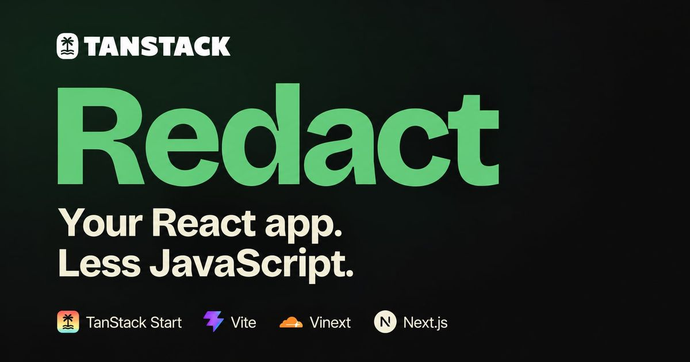
TanStack Redact graphic reading “Your React app. Less JavaScript.” with logos for TanStack Start, Vite, Vinext, and Next.js.

TanStack Redact 0.2.0 replaces React and React DOM in the browser without changing application code. Its stable integrations support TanStack Start, Vite, Vinext, and Next.js; with the latter two, React still handles server rendering while Redact takes over hydration and client rendering.

TanStack’s measurements show bundle reductions from 20.4% to 70.5% across its reference apps, but actual savings vary by project. The tradeoff is explicit: Redact renders synchronously, without React’s time slicing or interruptible rendering. A heavy render can therefore delay input, so compatibility and the busiest screens should be checked in each application.

Tanner LinsleyFound via This week in React

GitHub preview of the shader-effects-inc/shaders repository, described as a WebGPU component library for React, Vue, Svelte, Solid, JavaScript, and Framer.

Tanner Linsley’s AI-driven React projection experiment has become a TanStack project used in production. Redact is a smaller, React-compatible runtime that already works with Start, Next.js, Vinext, and Vite. On the server, React still handles SSR and Server Components.

The tradeoff is in rendering: Redact renders synchronously, without React’s time slicing. As the blog post acknowledges, a heavy render can still delay input. The smaller runtime therefore comes with a constraint worth considering for interfaces that need to remain responsive under load.

Shader Effects, Inc.Found via This week in React

Screenshot of The Website Specification, headed “What a good website does,” with four areas: the document, the experience, trust and discovery.

This specification brings together 178 topics covering a website’s technical responsibilities, including HTML, accessibility, security, performance, SEO, privacy and resilience. Each topic explains why it matters and how to implement it, with items marked as required, recommended, optional or to avoid.

A yes/no checklist turns those criteria into an audit that teams can revisit after fixes. Grounded in primary sources and platform-agnostic, the specification is also available to agents through a read-only MCP server, with no authentication required for its reference tools.

@jdevalk

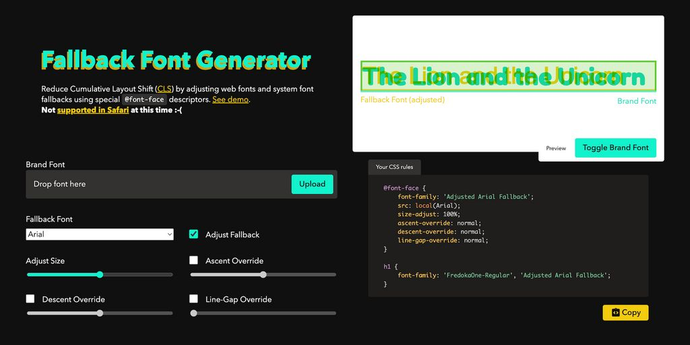
Screenshot of the Fallback Font Generator showing a comparison between an adjusted fallback font and a brand font, alongside generated CSS rules.

This tool adjusts a system font to more closely match a brand font while it loads. It generates the required @font-face rules—including size-adjust, ascent-override, descent-override, and line-gap-override—using a visual preview and adjustable controls.

The approach targets layout shifts caused by differences in font metrics. The resulting CSS can be copied into a project, though the page notes that the tool is not supported in Safari.

@screenspan

Next.js visual showing the article title about improving navigation in v0.

To reduce loading skeletons in v0, the team combines Next.js Partial Prefetching with cache rules suited to public and personalized data. Playwright instant() tests check that priority content is ready at click time, and remain in the codebase as CI regression checks.

Prefetching also responds to user intent: in large grids, details load on hover, focus, or touch rather than for every visible card. That adjustment followed a 2.9× increase in prefetch requests. The overall comparison reports lower daily costs, while cautioning that the change cannot be attributed to this refactor alone.

Aurora Scharff